

Download Yet Another Window Resizer – window resizer, Firefox extension, responsive design, web developer tool, browser tool, web testing, UI testing, development utility, resize browser window, developer extension
Overview
Yet Another Window Resizer is a lightweight Firefox extension designed to assist web developers and designers in efficiently testing responsive layouts and UI elements across various screen dimensions. The tool enables users to resize the browser window to precise dimensions, supporting both standard and custom configurations. This functionality is particularly valuable during the development and debugging phases, where visual consistency across devices is critical. The extension is tailored for professionals who require quick, repeatable window size adjustments without manual resizing or complex code.
Target users include front-end developers, UI/UX designers, and quality assurance testers who regularly validate how web content adapts to different screen sizes. The tool helps ensure that responsive design principles are properly implemented, reducing the risk of layout breakage on mobile, tablet, or desktop interfaces. Although the developer did not provide additional technical details, the extension’s longevity—first released in 2008—suggests a stable, well-maintained utility within the web development community.
Real-world use cases include testing navigation menus on small screens, verifying image scaling in fixed-width containers, and validating form layouts across multiple resolutions. In the broader app ecosystem, Yet Another Window Resizer fills a niche by offering a simple, focused solution for a common development task. Its continued availability underscores its reliability and relevance in modern web workflows.
Key Features & Functionality
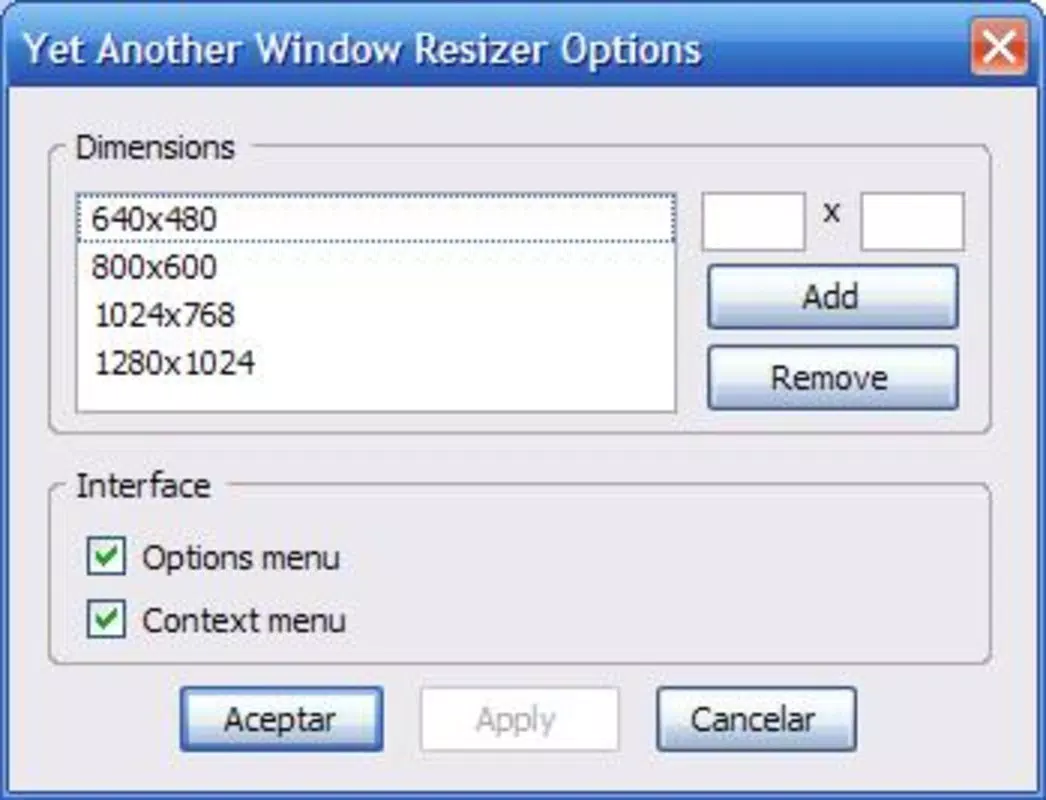
- Flexible Resizing Options: The extension provides a range of default window sizes, including 640x480 and 1280x1024, which are commonly used in legacy and standard web testing. Users can also define and save custom dimensions to match project-specific breakpoints.
- Easy Access via Context Menu: A right-click context menu offers direct access to the resize function, allowing developers to quickly adjust the browser window without navigating through multiple menus or using keyboard shortcuts.
- Developer-Centric Design: Built specifically for web development workflows, the tool supports rapid iteration during design validation, reducing the time spent on manual window adjustments and improving overall productivity.
- User Customization: Users can tailor the list of available sizes to reflect their project’s unique requirements, making it adaptable to different design systems and responsive frameworks.
- Non-Intrusive Operation: The extension runs in the background without altering the browser’s core functionality, ensuring minimal performance impact during active development sessions.
For example, a developer testing a mobile-first layout might use the 375x667 size to simulate an iPhone screen, while a designer verifying a dashboard might switch to 1920x1080 for desktop consistency. These use cases demonstrate the tool’s practicality in real-world development environments.
Interface, UX & Performance
The interface of Yet Another Window Resizer is minimal and integrated directly into Firefox’s context menu, ensuring a seamless user experience. There is no dedicated dashboard or settings panel, which keeps the tool lightweight and unobtrusive. Navigation is intuitive: a single right-click in the browser window triggers the resize menu, where users can select a predefined size or enter a custom dimension.
Visual style aligns with Firefox’s native design language, maintaining consistency across the browser’s interface. The lack of visual clutter enhances usability, especially during intensive development sessions where focus is paramount. Although the developer did not list formal performance metrics, the extension’s small file size of 1.2 MB suggests efficient resource usage.
Responsiveness is consistent with typical Firefox extension behavior—resizes occur instantly upon selection, with no noticeable lag. Stability appears reliable, given the extension’s long-standing presence in the Firefox ecosystem. However, specific requirements were not listed, and compatibility with newer Firefox versions was not fully disclosed.
Platform Compatibility & Technical Requirements
Yet Another Window Resizer is available exclusively for the Firefox browser. The current version is 1.2.3, with a file size of 1.2 MB. The developer did not specify minimum OS requirements or compatibility details for different Firefox versions. As such, users should ensure their Firefox installation is up to date to avoid potential issues.
Given the extension’s release date of 2008, it has undergone multiple iterations to maintain compatibility with evolving web standards and browser updates. However, without explicit confirmation from the developer, users are advised to verify functionality on their specific Firefox setup.
Pros and Cons
Pros
- Lightweight and fast, with minimal impact on browser performance.
- Simple, intuitive interface accessible via right-click context menu.
- Supports both default and custom window sizes for flexible testing.
- Designed specifically for web developers and designers, enhancing workflow efficiency.
- Free to download and use, with no hidden costs or subscriptions.
Cons
- Exclusive to Firefox; no support for other browsers like Chrome or Safari.
- Limited to desktop environments; not available for mobile or tablet platforms.
- No visible settings or configuration panel; customization is limited to context menu options.
- Compatibility with future Firefox versions is not explicitly confirmed.
- Developer did not provide detailed technical documentation or update history.
FAQ
Is Yet Another Window Resizer safe to install?
Yes, the extension is available through official Firefox Add-ons channels and is free from known security threats. As with any browser extension, users should only install from trusted sources.
Can I use this tool on mobile devices?
Currently, the extension is designed for desktop use within Firefox. It is not available for mobile browsers or tablet platforms.
Does the extension require an internet connection?
No, the tool operates offline. Once installed, it functions without requiring an active internet connection.
How do I update Yet Another Window Resizer?
Updates are automatically managed through the Firefox Add-ons manager. Users should ensure their browser is updated to receive the latest version.
Is there a desktop app version of this tool?
Yet Another Window Resizer is a browser extension and not a standalone desktop application. It runs within the Firefox environment and cannot be used independently.
Final Thoughts
Yet Another Window Resizer remains a reliable and efficient tool for web developers and designers who need to test responsive layouts across multiple screen sizes. Its straightforward functionality, combined with support for custom dimensions and quick access via context menu, makes it a valuable addition to any development toolkit. While it lacks modern UI enhancements and is limited to Firefox, its focused design and long-standing presence in the developer community speak to its enduring utility.
For professionals working on responsive web projects, this extension offers a practical, no-frills solution that enhances testing speed and accuracy. Its free availability further increases its appeal as a must-have utility in the web development workflow.
Download Yet Another Window Resizer now


